Showing posts with label Reviews. Show all posts

Monday, April 7, 2014

Comic Neue The new, suited, Comic Sans

Craig Rozynski is an Australian digital designer in Japan. He is the creator of the new Comic font. It is the refined and improved version of the old Comic Sans. Comic Sans was something I liked to use when I was 10 and liked to play with the computer. It is a font, though that to this day I have almost never seen used anywhere for serious purposes. Sure there are places such as the local kids shop or a pizza place that have. The purpose was to show their carefree nature(CERN and the Vatican are said to have used it too :/ ). This version though seems a perfect combination of cool and serious.


Here is quoted what Rozynski aims with this new font:
"Comic Sans wasn’t designed to be the world’s most ubiquitous casual typeface1. Comic Neue aspires to be the casual script choice for everyone including the typographically savvy.
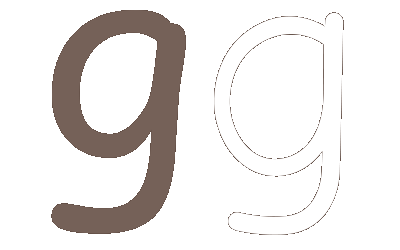
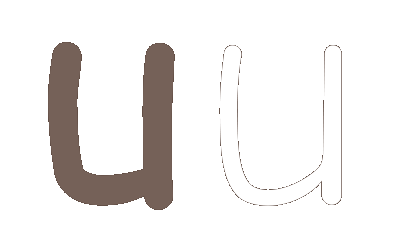
The squashed, wonky, and weird glyphs of Comic Sans have been beaten into shape while maintaining the honesty that made Comic Sans so popular.
It's perfect as a display face, for marking up comments, and writing passive aggressive office memos."

Here you can see some changes from the original versions:

                                                     
This new experiment shows our love for slim fonts, Helvetica being the best example in this case. But loosing a few kilos on a font make it that much better?

The font is available for download for free for a limited time. If you are interested click here and get it. I did. What harm can it do?

Justdelete.me Delete your online presence!

Nowadays its hard to find someone who doesn't have a bunch of online accounts. We all do. We divide our lives between the virtual one and the physical one. I guess calling it "real life" is a little bit antiquated, since we can wear our "virtual life" on our wrists and our eyes.

Starting from Facebook, Twitter and moving on to Gmail, Outlook and finishing at some forum that you registered on a while ago, the sheer number of online accounts that we have is something to think about. Even multiple accounts at the same site.

Sometimes it can just be too much. We have all done it so no one is better than the other. One needs to sit back and think though, what is necessary and what is useless. It is a waste to keep accounts that you used just once to check a cool new service.

There are some sites that aren't very friendly at allowing you to close your account. Yes I'm talking about you Amazon. Of course there are others who are okay with removing you from their web service, but they are a dying breed.


British developer Robb Lewis created justdelete.me to tackle that specific problem. What he aims to do with it is show you which services make it easy and which ones make difficult erasing your account. It will even tell you which accounts are impossible to close.

It ranks the sites according to the steps a user needs to take to close the account. It also highlights some sites which you might want to stop using. The service is free so for anyone who wants to delete their personal presence

It may not be easy, but it's worth doing. Click Here to check it out.


Friday, April 4, 2014

What is Komodo Edit and how to install it in Ubuntu?

"Komodo Edit is the free and Open-Source counterpart of Komodo IDE.
Looking for a powerful editor without all the advanced functionality an IDE comes with? Komodo Edit is for you. "-ActiveState

The sentences quoted above are taken from the official Komodo Edit website. This app is a beefed up text editor. If you want to work on your HTMLs or Css' (and much more) this is a great text editor.
Komodo Edit is based on Komodo IDE, a commercial product from ActiveState. The later one is a complete development environment for web and cloud-based projects. It's "little brother" Komodo Edit is a little different. It is open-source and has an unbeatable price, its free. It is based on the same codebase as Firefox so it is available for all major OSs. It also has a Firefox-like system to find and install add-ons.

Komodo supports customizable color schemes. You can find the themes online and simply drag and drop them on the apps window. This will install the theme
Another feature is its build in FTP client. This allows you to work with files on your servers without needing to download them or to create new projects.
Komodo also offers autocompletion, code folding and simple text zooming using the mouse wheel.

Installation:
Komodo Edit is offered for:
How To Install in Debian/Ubuntu/Mint

Although the installation for Windows and OS X is pretty straightforward, the same can not be said for Linux users. They offer a binary file which can be a pain to install for a big number of people. I am going to write here 3 simple command through which you can install in a non-painful way(for most).

sudo add-apt-repository ppa:mystic-mirage/komodo-edit

sudo apt-get update
sudo apt-get install komodo-edit

Enjoy!

PS: My editor of choice is Sublime text. If you want to try that one out too, click here: 

Sublime Text: How to install in Ubuntu based distributions

CCleaner comes to Android


CCleaner is one of the tools that I recommend to anyone who owns a laptop/desktop. It is great to clean up, optimize and maintain your device.
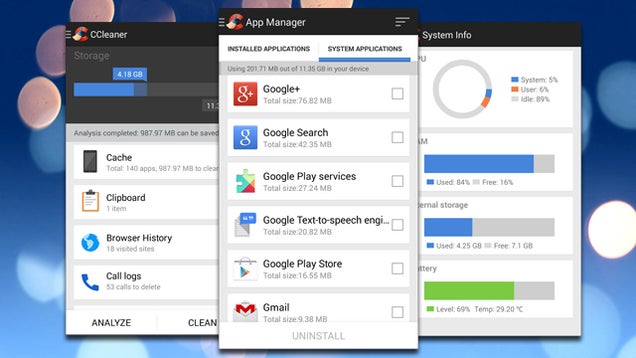
Now this awesome tool is coming to Android. Right now it is in the Beta stage, but still packs some good features.

The app allows you to:
  • clear app cache and data
  • bulk uninstall unwanted applications
  • erase your browser history or call logs
  • remove your clipboard data.
 Some of these features are available from Android itself. I guess it doesn't hurt to have some extra ones, and all together at the same place.

To get it you will need to join the Google+ Community and then download the app from Piriform.*

*There is a Play Store link but it doesn't work for me. You can try it. Link

Nautilus Terminal, File Manager and Terminal combined

Nautilius is the file manager of choice of Ubuntu. It is one of the best file managers out there, and since Ubuntu is the number 1 Linux distribution out there, is used by the majority of Linux users.
Terminal on the other hand, is one of the most important apps in Linux. It allows the user to communicate to the shell and pass instructions. Most of the people who don't know Linux think that everything is still done in the terminal.
Even though that is not completely true, the Terminal is a vital part of the Linux experience. You just can't completely ignore it. Of course new user-friendly distributions are trying to change this. To this day, none has been completely successful. It is not the distros' fault. There are simply a lot of apps out there who aren't represented in the different software centers, or just don't put Linux in their top priorities.
So at some point you'll have to use the Terminal.

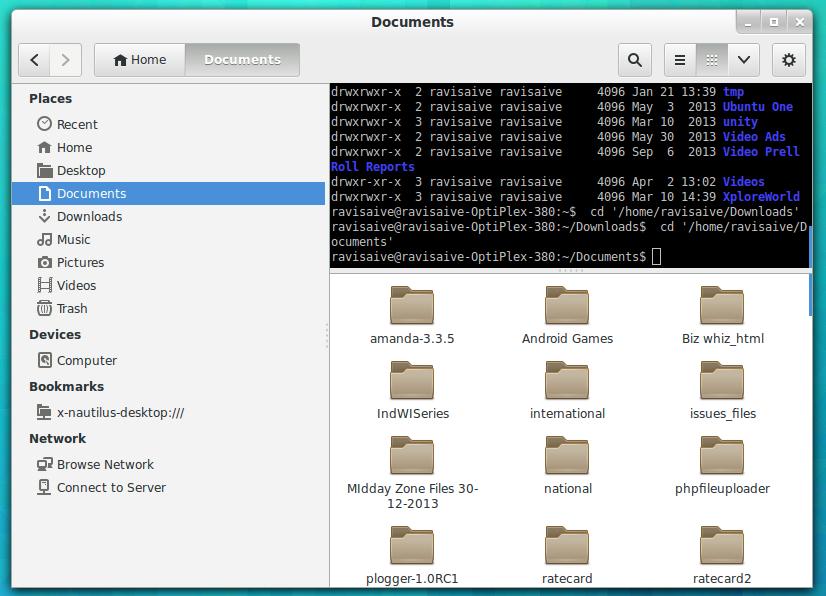
Nautilius Terminal combines these two essential apps together. It follows your movements in the GUI and shows them in the terminal(cd ./example). Some of its features are:
  1. Completely compatible with Nautilus File Browser.
  2. Designed to follow your movement and Instructions within directories.
  3. Feature of Hide/Show Terminal in file browser, as required makes it very much useful.
  4. Supports Copy and Paste in Terminal.
  5. Supports Drag and Drop of files/folders in Terminal.
  6. The Embedded Terminal is re-sizeable, as per need.
 Following are the instructions on how to install it:

Debian/Ubuntu/Mint
$ sudo add-apt-repository ppa:flozz/flozz
$ sudo apt-get update
$ sudo apt-get install nautilus-terminal

Sunday, March 30, 2014

The illusion of money


This is a picture I have had in my laptop for almost a year now. I felt it was time to share it with the world. Here is represented in a graphical interface the flow of money from a multitude of companies in our perfectly capitalized world.
As you can see, even though there is a very large number of companies out there the money really goes to a handful of them.
Now this picture is not complete, since industries like oil, telecommunication, electronics, etc are not represented here, but the idea is the same. Our market, our world is not as open and fair as it is pretended to be.
I won't say much more about this because I want you to think about this yourselves. This is not a conspiracy theory, it's the reality in which we live in.
Check it out and tell me what you think.

Saturday, March 22, 2014

Caffeine, Solution to Computer Sleep

This is a solution to a problem I had raised in a previous post, that of the computer going to sleep while watching a video usually with flash player.

Post: A-bugging-thing-in-everyday-linux-based-OSs

Thankfully I found an app that targets this specific problem. It's called Caffeine and it does exactly that. It allows you to add programs that will prevent the computer from sleeping while their running. It even has an option specific to Adobe Flash Player.

Here is a picture demonstrating this:

Its pretty simple and straight forward to use.

How to install:

Just copy paste the following commands in the Terminal


sudo add-apt-repository ppa:caffeine-developers/ppa

sudo apt-get update


sudo apt-get install caffeine python-glade2

Tip: Connecting to archive.ubuntu.com takes a long time? 

Friday, March 21, 2014

A bugging thing in everyday Linux based OSs

As an everyday Operating System I am using Elementary OS for more than a month now. I have to admit, it is one of the best Ubuntu based OSs out there. The feeling you get by using it is of a premium software. Everything feels carefully thought and crafted.

Before that I have used other operating systems such as Linux Mint, Ubuntu, etc. All of them very easy and comfortable to use

Having said that there is something that throughout the years I have not quite grasped yet. Streaming videos seems a seamless experience in Windows. You open the video and whether it is 5 mins or 50 mins it will prevent your laptop from going to sleep or from dimming the brightness. Also the mouse will also fade away. This doesn't happen in ElementaryOs or Linux Mint or even Ubuntu.


I am not talking about sites like YouTube. I am talking about Putlocker(now Firedrive),  Gorillavid, NovaMov, VidBux and copy sites of the aforementioned. They rely solely on  flash player without any extras.

I am annoyed of my laptop going to sleep halfway through the movie.

In software such as VLC this doesn't happen.

Do you have the same problem as me? If so comment what you think, or whether you have a solution about this(other than increasing the time it takes before the laptop goes to sleep).

Saturday, May 4, 2013

Samsung Galaxy S4: 4 or 8 Cores? Does it really matter?

The Samsung galaxy S4 is one of the most awaited android smartphones of the year. Now its finally on sale(in some countries). With a price that is around $700, it promises to be the best selling android smartphone to date. Samsung is aiming to sell around 100 million copies. it is offering the S4 in two variants, not out of desire but out of lack of parts. One variant is packing the quad core Qualcomm Snapdragon 600 processor against the other one that packs the Exynos Octa. But what does it really make a difference for the user?

According to co-CEO of Samsung Electronics J. K. Shin it isn't. He didn't go into details though. Some might say that its only marketing, Samsung doesn't want the users to pay attention only to the S4 variant with eight cores, and all the rest of them to remain unsold. I am telling you that for once the BIG company is telling you the truth(well most of it though).

The Exynos Octa indeed has four cores more than the Snapdragon 600, but it uses only four cores at a time. The chip has four Cortex A7 cores and four Cortex A15. These cores have different features. The A15 is way better in terms of performance, but the A7 is a lot better in terms of battery life. In a scale of 0-100, the A15 uses 100 battery and the A7 uses 30(as seen on the demonstration made from Samsung). The A7 cores are used for processes such as playing videos or lightweight applications to save battery life. On the other hand when the users wants to play games or other resource hungry apps the A15 cores step up. It is a very clever combination or as Samsung calls it big.LITTLE. Having said that this is a new technology and isn't perfect. There are still some issues but lets leave those to the technicians. What matters is what comes to our hands and what we can do with it.


Conclusion:

So a simple way to put it is this: You will use only four cores regardless of the Galaxy S4 variant you have. So the speed that your phone is going to play videos, games, open webpages or anything else will be almost the same.